Troubleshooting
| Symptom | What to check |
|---|---|
| Status shows “CLI not found” | Set the executable path under Settings > Connection > Agent > Advanced (executable / command) (it opens automatically while the CLI is not found) |
| Stuck on “Still connecting… (taking longer than usual)” | The sign-in state (Settings > Connection > Agent; if ANTHROPIC_API_KEY is set it takes precedence, so check the authentication method actually used here too) and Settings > Connection > CLI output (stderr) |
| Too many permission cards | Add per-tool “Always” rules, or raise the auto-approve level |
| Japanese text shows in patchy bold or as □ | Enable “Prefer CJK-friendly UI font” under Settings > Panel > Appearance, or install UITK Font Fix |
| You dismissed an error chip by mistake | Remove it from the ignore list under Settings > Panel > Console errors |
| Unity tools fail with a “timed out waiting for the Unity main thread” error | The Editor has lost focus or is in Play mode. Bring the Editor back to the front, or have the agent fetch the result with uap_job_status |
A claude process remains after the editor quits | It is ended automatically the next time the panel starts |
| You cannot sign in, or it stays at “Not signed in” | See “When it does not work” in each agent’s page: Claude Code / Codex / Grok Build / Gemini CLI |
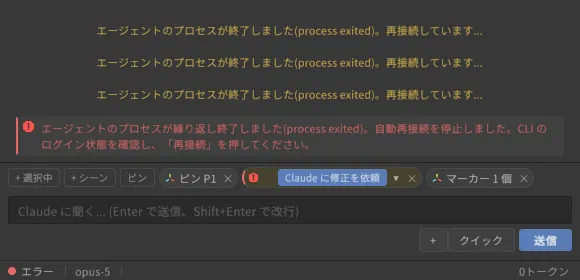
| “The agent process exited repeatedly (…). Automatic reconnect suspended; check the CLI login state, then press Reconnect.” | The CLI has crashed 4 times in a row. Check that claude starts in a terminal (expired login, failed CLI update and so on), then press “Reconnect” in the banner or the header |

If none of this solves it, report it on GitHub Issues with the contents of Settings > Connection > CLI output (stderr) and the steps to reproduce.