Unity tools (UapOps)
Through a built-in MCP server (local loopback only, token-authenticated), the panel lets the agent operate the Unity Editor directly. Turn on “Enable Unity operations (UapOps)” under Settings > Unity integration > Unity operations (UapOps), and choose the modules you want to use.
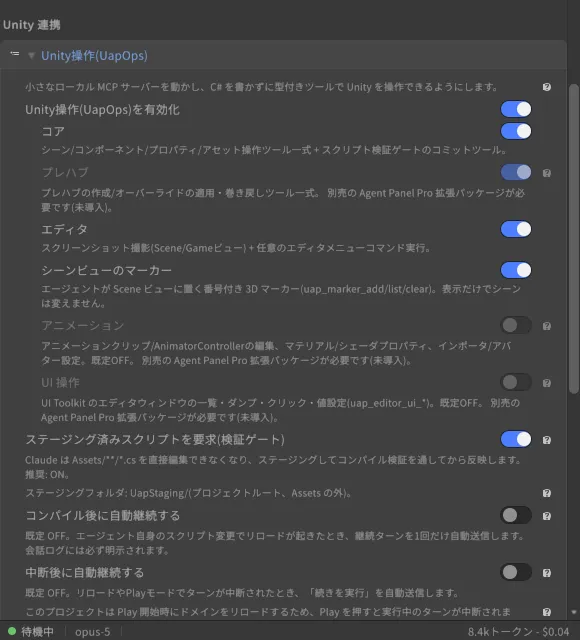
| Module | What it can do |
|---|---|
| Core | Create, find and inspect scene objects, add components, set properties and Transform, asset operations, run menu items, stage and commit scripts, recompile the project and fetch the error list (uap_compile; for re-checking after editing directly in an external editor. Scripts the agent writes itself still go through uap_scripts_commit validation as before), uap_help, which looks up the details (description and schema) of registered tools by name, and uap_game_watch, which keeps reading component fields/properties at a fixed interval and returns the changes as a time series (specified the same way as uap_object_inspect, dotted paths such as velocity.y also work, up to 6 seconds per call, by default only the samples that changed plus the first and last, and until stops on a condition such as “when it reaches 0”; read-only) |
| Prefab* (Agent Panel Pro) | Create prefabs, list, apply (Apply) and revert (Revert) overrides, open and close Prefab Mode. To edit the contents of a prefab, open its stage (while it is open, other tools refer to that stage when you omit the scene name). On close, pending edits are written to the prefab. Creating from something that is already a prefab instance makes a Variant, per Unity’s behavior, and the result says which one you got |
| Editor | Scene / Game view screenshots (annotate_ui:true lists the clickable / draggable uGUI elements with hierarchy path, kind, displayed text and the same coordinates as uap_game_pointer; with ui_only:true the image is omitted and only the list is returned), running any editor menu item, starting, stopping, pausing and single-stepping Play mode (uap_play_mode), reading (uap_console_logs) and clearing (uap_console_clear) the Unity console log, getting and changing the Game View resolution (uap_game_view_size; a size not in the list is added to the dropdown under a name like “Agent Panel 1920x1080”), input to the running game (uap_game_pointer: click / long-press / drag on uGUI buttons, sliders and so on, specified by hierarchy path or screenshot coordinates. uap_game_key: key press / hold / release through the Input System; the legacy Input Manager has no injection point, so this is only for projects that use the Input System. uap_game_mouse: click, long-press, move, delta and scroll for game code that reads Mouse.current directly. With dry_run:true, neither Play mode nor the Input System is needed, and you can just check “what is at that coordinate in 3D / 2D”), getting project information (uap_project_info: returns the Unity version, build target, Active Input Handling, Enter Play Mode Settings, Run In Background and which packages that affect this panel’s behavior are present, in one call; read-only), and uap_editor_focus, which brings the editor back to the front. Game / Scene view video recording (uap_record_video: start returns immediately and recording proceeds in the background, so other tools can be used meanwhile; stop finalizes the file. mp4 on Windows and macOS, webm on Linux, up to 300 seconds. A domain reload stops the recording, so to film the game, enter Play mode first and then start), and recording and replaying input (uap_input_record / uap_input_replay: saves keyboard and mouse operations during Play, with timestamps, to JSON under Library/UnityAgentPanel/InputRecordings/ and replays the same operations at 0.25 to 4x speed. When a replay ends, is interrupted, or Play ends, every pressed key and button is released. Requires the Input System). Lightmap baking (asynchronous, with preflight diagnostics) and Bakery GPU Lightmapper integration* (Agent Panel Pro) |
| Dynamic code | uap_execute_code, which runs C# for operations the typed uap_* tools cannot do (the equivalent of uLoop’s execute-dynamic-code). It compiles the method body the agent wrote in the background (the editor does not freeze), runs it referencing the project’s assemblies, and returns the return value and the Debug.Log output produced during the run. The permission card always shows the full code, and this is not omitted at any auto-approve level. When it detects things such as process launch, networking, deleting files or assets, reflection by name or infinite loops, the first call runs nothing and only returns what was detected; it runs only when called again with confirm:true (detection is a guideline, not a sandbox). A run is grouped into one Undo group, and the reply tells you whether there were changes that Ctrl+Z can revert. Executed code stays in memory until the next domain reload, so past 32 entries it recommends action:"reset" (a reload). You can disable just “Dynamic code” with the module toggle in the settings (enabled by default) |
| Animation* (Agent Panel Pro, off by default) | Create AnimationClips (float / GameObject on-off / sprite-swap curves, with key interpolation), edit AnimatorControllers (parameters / states / transitions / layers / sub-state machines / Entry and Exit / Write Defaults / Motion Time, detailed transition settings, deleting elements), create and edit BlendTrees (1D / 2D / Direct), add, configure and remove StateMachineBehaviours, create and edit AvatarMasks and AnimatorOverrideControllers, material/shader properties, asset property settings, importer settings |
| UI automation* (Agent Panel Pro, off by default) | Editor UI automation by listing, dumping, clicking and setting values in UI Toolkit windows |
| Profile authoring* (Agent Panel Pro, off by default) | Draft and validate extension profiles for this project (.uap-profiles/*.json). It scans the types of the installed packages to write the detection conditions and leaves only the instruction text as a TODO. A profile that has only been created is not injected; it needs approval in the extension profile list. Writing out Claude Code skills (.claude/skills/<name>/SKILL.md) is part of the same module |
| Avatar measurement* (Agent Panel Pro, off by default) | Measures an avatar’s triangle count, material slots, renderers, bones, blendshapes, PhysBone / Contact / Constraint components and missing scripts. If you pass a second hierarchy (such as a baked clone), it returns per-statistic differences. If the VRChat SDK is present, it also reads the PC / Quest performance rank. It can run an NDMF manual bake and produce the difference against the clone in one go (with confirmation, since it writes generated output). Reading and writing the expression menu and parameters also belongs to this module; before writing, it validates every item against the VRChat SDK rules (the control limit per menu, the 256-bit synced-parameter budget, the number of puppet axis parameters, and controls that point at parameters that do not exist) |
| Batch execution* (Agent Panel Pro, off by default) | Runs several Unity operations in one call with one permission card. Everything is validated before running, so if even one item is invalid, nothing runs. Destructive operations (such as a prefab Apply) and tools from modules you have turned off cannot be included |
| Test execution* (Agent Panel Pro, off by default) | Runs the project’s EditMode tests in the Unity Test Runner and returns the names, messages and stacks of failed tests. You can narrow by assembly name, regular expression, full test name and category. It can also just return “what tests exist” without running them (so you do not have to guess at filters). A run where no filter matched anything is reported as “0 tests” (the Test Runner itself reports that as a success). PlayMode is not supported. This row is enabled only in projects that have com.unity.test-framework |
| Particles* (Agent Panel Pro, off by default) | Reads and writes Particle System modules by their scripting names (main / emission / shape / colorOverLifetime …). Serialized names are different (the Inspector’s “Main” is InitialModule in the file, Duration is not there but is the top-level lengthInSec, and shape is a plain integer with no enum name), so you do not need to learn them. Curve values fix the mode together with the value, so “I meant a number but it became a curve multiplier” does not happen; writes to a disabled module (Unity accepts them and does nothing) and obsolete properties that no longer have any effect are rejected. Burst settings can also be made here |
| Mesh generation* (Agent Panel Pro, off by default) | Compile-free mesh operations and non-destructive models. uap_mesh_create generates a mesh from numbers: box, plane, cylinder, cone, sphere, torus, stairs, extrusion of an XZ outline, a lathe of an XY profile, an SDF tree (sphere, box, capsule, cylinder, torus and ellipsoid combined with union / intersect / subtract, with smooth rounding the seams = organic shapes and smooth booleans), and a raw vertex list (raw). assetPath saves it as a Mesh asset, and place creates a GameObject in the scene with a MeshFilter + MeshRenderer (and optionally a MeshCollider). uap_mesh_inspect returns an existing mesh’s vertex count, bounds, storage location and whether it is closed, and lists vertices in a range or nearest to a point. uap_mesh_edit edits an existing mesh over a region (sphere + falloff = proportional editing, box, whole mesh): move, inflate, smooth, subdivide, noise. Unity built-in or imported meshes are copied with detach:true before editing. uap_mesh_boolean makes a union / intersect / subtract of two closed meshes as a new mesh (the inputs are not changed). Generation tools only create new things and never overwrite existing assets. uap_mesh_validate reports, with severity, degenerate and duplicate triangles, non-manifold edges, inconsistent winding, open edges (informational by default since they are often intentional), flipped normals, faces uniformly facing inward (informational for skyboxes and the like) and coplanar overlaps, and uap_mesh_repair repairs the ones you choose (the default is a safe combination that does not change the shape; welding, overlap removal and hole filling are opt-in, and Ctrl+Z works). uap_scene_zfight_scan lists faces of different objects in the scene that overlap on the same plane (Z-fighting) and suggests fixes. uap_mesh_export / uap_mesh_import write and read meshes as glTF (.glb / .gltf), so you can round-trip with external tools (Blender, Python mesh kernels, generative AI). place.checkZFight: true also checks right after placement. Non-destructive models: a hierarchy of Model Nodes (distance-field shapes; position by Transform, combined with their children by fold / smooth) under a Model component is handled with uap_model_inspect (reads the tree as JSON: node ids, signatures, changes since last time, staleness, and the signed distance at any point), uap_model_apply (edit by patch; one call = one Undo) and uap_model_evaluate (meshes the root’s MeshFilter using a sparse brick grid + dual contouring). Nodes include mirror, repeat, shell and offset, tube shapes from sketch lines, and shapes that turn any Unity Mesh into a distance field (with cage modifiers for bevel and Catmull-Clark subdivision with creases). A Live model previews on every edit and builds the real mesh once you stop (human edits are recorded in the edit log, so the AI can read them; if the project has Burst, evaluation automatically uses the Burst version). If you make node values follow expressions with the model’s script (var / bind), you get a parametric model where one number changes the whole thing. A node’s material / color paints the evaluation result into submeshes and vertex colors, so one mesh can use as many materials as it needs (color / colors / uv2 of uap_mesh_create, materials of placement, and glTF vertex colors are supported too). uap_model_bake does decimation, UV unwrapping, normal / AO baking from the distance field and asset output in one go (remesh: true rebuilds into a mostly-quad mesh following curvature, ridges and material boundaries and also writes a quad cage; output: "cage" writes the distance field’s quads as is into a Mesh with quad topology). uap_mesh_remesh rebuilds any mesh into a mostly-quad mesh with a target face count. uap_cage_edit edits a cage Mesh with extrude, inset, loop cut, bridge and triangle-to-quad (keeping the quad topology), and a mesh leaf’s edges specify crease, bevel and sharp by the coordinates of both ends of an edge. A node’s displace + falloff is a displacement brush with falloff. uap_forge_migrate migrates a Forge scene to a non-destructive model. You can also make material-side assets with uap_material_create (presets lit / unlit / vertexColor resolved for the render pipeline, shortcuts and properties, shared with reuse), uap_texture_create (PNGs of solid color, gradient, checker, stripes, noise and palette atlas, plus import settings) and uap_shader_create (writes out bundled templates: vertex color, window interior mapping, decal, flipbook, triplanar). The cubemap of uap_texture_create is a room interior for windows, and the preset of uap_particle_set is a one-line recipe for smoke, fire, sparks, rain or dust. When the evaluation result is split by per-node material / color, triangles are cut at the exact position where the owning node changes, so material boundaries do not get a grid-like jagged look |
| Scene view markers | Places numbered 3D markers in the Scene view (display only; does not change the scene) |
| Web fetch | uap_web_fetch, which lets the agent fetch the contents of a URL. PNG / JPEG are downscaled and returned as images (thumbnail in the tool card), GIF / WebP are returned as they are, PDFs and other files are saved under Library/AgentPanel/Downloads/ and the path is returned (Claude Code can read PDFs with Read; adding as:"text" or pages:"1-5" makes the panel extract the body text and return it, so even an agent that cannot read PDFs sees the contents. Layout is flattened, and pages that are only images or scans come back empty), and HTML becomes the body text plus a list of the image URLs and link URLs on the page. The agent’s own web fetch tool can only return text, so use this one for “show me the image or PDF you found by searching”. With save_to, it saves directly under Assets/ and imports it (“grab this texture and put it on the material” takes one step; an existing file is not overwritten unless you specify overwrite). Public hosts only (localhost, LAN and link-local are rejected), up to 20 MB, and no cookies or authentication headers are sent. You can narrow the destinations further with “Allowed hosts” and “Blocked hosts” in the settings (one host per line, subdomains included). uap_web_search in the same module is a search for agents that have no web search of their own. It works once you enter “Search provider” (Brave Search API / Tavily) and “Search API key” in the settings, and returns titles, URLs and snippets (with no key, it only tells the agent so and sends nothing outside). It does not change the project but does communicate externally, so it is excluded from the read-only auto-approve level and always shows a permission card with the URL (you can skip it with “Always”) |
* Modules marked with an asterisk require the separately sold Agent Panel Pro package (jp.colloid.agent-panel-pro). While it is not installed, the corresponding toggles are disabled and the hint reads “Requires the Agent Panel Pro add-on (sold separately; not installed)”. To install Pro, just enter the registry URL and product key you received at purchase under Settings > Agent Panel Pro updates (Settings reference), and the toggles become enabled after the next domain reload. Modules without an asterisk work with Core alone.
Tips:
- You can make requests in plain words (for example, “Add a PointLight as a child of the selected object and set its intensity to 3”). The agent picks the matching
uap_*tool and runs it after the permission card. - Run it and check: if you ask “run it and verify after the fix”, the agent starts Play mode (
uap_play_mode), reads the logs the game produced (uap_console_logs), and stops when done. Entering and leaving Play mode involves a domain reload, so the agent waits for the switch before checking the state. It declines to run while compiling. If Run In Background in Player Settings is off, Unity operations may time out when the editor loses focus during Play (a warning appears at the start). In that case the agent can bring the editor back to the front withuap_editor_focus(Windows / macOS; on Linux whenwmctrlis available). How a value changed over time (did HP reach 0, did the velocity settle) can be confirmed with evidence in a singleuap_game_watchcall, and how a multi-step operation looked with a video fromuap_record_video. - Tool list mode (Settings > Unity integration > Unity operations (UapOps), “Tool list mode”): Full lists the tools of every enabled module directly, as before. Compact lists only the core module’s tools directly, and uses the tools of the other enabled modules through
uap_tools(search by name, module and one-line summary) anduap_call(run a tool you found, by name). They are only not listed directly; the tools that can run, the permission cards and the Undo handling are the same as when called directly. Tool descriptions are sent to the agent at the start of every session, so for agents other than Claude Code (which have no mechanism for loading tools only when needed) this is a fixed cost every time. The default, Auto, picks Full for Claude Code and Compact for everything else. It takes effect from the next connection. The input schemas of tools in the Compact list are a lightweight version with each field’s description shortened to one sentence (types, required fields, options and so on are unchanged), and the full schema can be fetched withnames:[...]ofuap_help. - Playbooks (
topicofuap_help): procedures that span several tools, such as “verify by running in Play”, “press a uGUI button”, “fix a script and confirm it compiles”, “record and replay input” and “should I useuap_execute_code”, are fetched by the agent only when needed, as inuap_help topic:"verify-gameplay". The always-sent instructions carry only one line listing the IDs of the available playbooks. It works the same with every agent (Claude Code, Codex, Gemini and so on), and no file is created in the project. A playbook is available only when every tool it mentions belongs to an enabled module. - Undo: one turn’s worth of Unity operations can be undone together with a single Ctrl+Z. Ctrl+Z only takes back edits inside the scene; file changes such as scripts and assets stay.
- Revert this request: to take back a whole request, files included, use “Revert this request” at the top right of your message in the chat. It opens a confirmation card under the message that shows what will happen, the files involved and the caveats that apply. On Revert it puts the changed files back to their content from before the request, removes the files the request created, and undoes its scene edits through Unity’s Undo. It works after a domain reload and after an editor restart (scene edits can be undone until the editor is restarted). The button appears only on the newest request that changed something; reverting it moves the button to the one before. There is no redo. What
uap_execute_codeand menu items do to the scene is undone even when the code never calls Undo (the panel registers the scene’s state with Undo before they run, except for scenes over 50,000 objects). File changes made by shell commands,uap_execute_codeand menu items are covered in part: files they create are removed and files a command names are put back, but any other file they change cannot be restored, and the card lists them as files that cannot be restored. Turn it off under Settings > Unity integration, “Keep a checkpoint for each request” (on by default; stored inLibrary/AgentPanel/Checkpoints, the last 20 requests, up to 2 GB). - Script validation gate (“Require staged scripts (validation gate)”): C# the agent writes is first placed in a temporary folder, and only code that compiles goes into
Assets/. A domain reload is never triggered by broken code, and compile errors are returned to the agent so it corrects itself. The hook layer works on Windows only. - Irreversible operations (asset deletion, and with Pro, Apply to a prefab) are not run until the agent adds
confirm:true; only the scope of impact (what would be deleted, how many other instances) is returned. Check the details in the conversation before it proceeds. - Long-running operations (such as Pro’s lightmap bake) become jobs, and the agent fetches the result later with
uap_job_status. A response is returned even while the Editor is busy. - Extension profiles (Settings > Unity integration > Extension profiles): add the key points of detected third-party SDKs to the agent’s instructions.
- Your project’s own profiles (
.uap-profiles/*.jsondirectly under the project) work with Core alone. They take effect only after you read the full text and press “Review & approve”. - Bundled profiles that auto-detect VRChat SDK3 (common / avatar / world) / Udon / UdonSharp / NDMF / Modular Avatar / VRCFury / Avatar Optimizer / lilycalInventory / lilToon / UniVRM / MagicaCloth2 / Final IK / Bakery / RPG Maker Unite / ProBuilder are included in Pro. In a project without Pro, supported SDKs are not detected even if installed, and this section says so.
- Your project’s own profiles (
- uLoop integration (Settings > Unity integration > uLoop integration): because this panel’s
uap_*tools cover what uLoop does, the card is shown only in projects that have uLoop (if it is not installed, there is no uLoop item in the settings, and the panel has no button to install uLoop). The card has these three things.- A one-line note: “uLoop is installed. This panel’s own tools cover it; removing it is recommended unless you use it elsewhere.” Hovering shows the details. uLoop keeps an editor-side server and a 16 ms tick pump running, and puts the descriptions of its skills (about 5.7 KB, roughly 1.5 to 2k tokens; measured with uLoop 3.6.3 on 2026-09-21) into every agent session. This panel cannot stop these (they belong to uLoop). To tone it down, use
Window > Unity CLI Loop; to stop it completely, remove the package. - Let the agent run uloop commands (toggle; off by default in new settings): when turned off, (1) the agent’s instructions state that “uloop is denied”, (2) deny patterns for each shell are added to the launch arguments of the next connection, and (3) any uloop command that still arrives is denied, and the
uap_*tools to use instead are shown in the conversation. When turned on, uloop is kept as an escape hatch for operationsuap_*cannot express. It takes effect from the next connection (the same as the allowed / disallowed tool lists). This only stops the agent’s use; it does not stop uLoop itself. A value saved by an earlier version (where the default was on) is kept as it is. - Removal (the “Remove uLoop” button): the only way to truly stop what stays resident is to remove the package, so there is a removal path. The changes (the manifest.json diff) are shown first, and a
.uap-backupis made before writing. Unity does the dependency removal, and this panel tidies up only the OpenUPM settings it added itself (it does not touch wide scopes it did not write, scopes other packages still use, or registries other than OpenUPM). The tidy-up is a second stage that runs after the removal finishes; if it fails, the removal itself stays successful and “manifest.json still contains settings” is shown. Theuloopallow rule and guidance snippet in the settings remain (the confirmation card says so as well). Once the removal finishes, the card disappears (it stays until the result has been shown). Design:docs/design-notes/2026-09-22-uloop-remove-from-panel.md,docs/design-notes/2026-10-02-uloop-card-final.md. - Play mode control, reading and clearing the console log, screenshots, clicks and key input to the running game, committing scripts and running tests are all covered by this panel’s own
uap_*tools (you do not need uLoop; hot-reload / pause-point is Agent Panel Pro, and the equivalent of execute-dynamic-code isuap_execute_code). Details and measurements:docs/design-notes/2026-09-21-uloop-always-loaded-cost.md.
- A one-line note: “uLoop is installed. This panel’s own tools cover it; removing it is recommended unless you use it elsewhere.” Hovering shows the details. uLoop keeps an editor-side server and a 16 ms tick pump running, and puts the descriptions of its skills (about 5.7 KB, roughly 1.5 to 2k tokens; measured with uLoop 3.6.3 on 2026-09-21) into every agent session. This panel cannot stop these (they belong to uLoop). To tone it down, use